=== Plugin Name === Contributors: studiopress, nathanrice, bgardner, dreamwhisper, laurenmancke, shannonsans, modernnerd, marksabbath, damiencarbery, helgatheviking, littlerchicken, tiagohillebrandt, wpmuguru, michaelbeil, norcross, rafaltomal Tags: social media, social networking, social profiles Requires at least: 4.0 Tested up to: 5.4 Stable tag: 3.0.2 This plugin allows you to insert social icons in any widget area. == Description == Simple Social Icons is an easy to use, customizable way to display icons that link visitors to your various social profiles. With it, you can easily choose which profiles to link to, customize the color and size of your icons, as well as align them to the left, center, or right, all from the widget form (no settings page necessary!). *Note: The simple_social_default_glyphs filter has been deprecated from this plugin. == Installation == 1. Upload the entire simple-social-icons folder to the /wp-content/plugins/ directory 1. Activate the plugin through the 'Plugins' menu in WordPress 1. In your Widgets menu, simply drag the widget labeled "Simple Social Icons" into a widget area. 1. Configure the widget by choosing a title, icon size and color, and the URLs to your various social profiles. == Frequently Asked Questions == = Can I reorder the icons? = Yes, icons can be reordered with the use of a filter. See: https://github.com/copyblogger/simple-social-icons/wiki/Reorder-icons-in-version-2.0 = Can I add an icon? = Yes, icons can be added with the use of a filter. See: https://github.com/copyblogger/simple-social-icons/wiki/Add-an-additional-icon-in-version-2.0 = My icon styling changed after updating = If your theme includes custom icon styling, you can try adding this line to your functions.php file: `add_filter( 'simple_social_disable_custom_css', '__return_true' );` This will remove icon styling options in the widget settings, and prevent Simple Social Icons from overriding custom theme styling. = Which services are included? = * Behance * Bloglovin * Dribbble * Email * Facebook * Flickr * Github * Google+ * Instagram * LinkedIn * Medium * Periscope * Phone * Pinterest * RSS * Snapchat * StumbleUpon * Tumblr * Twitter * Vimeo * Xing * YouTube NOTE - The rights to each pictogram in the social extension are either trademarked or copyrighted by the respective company. == Changelog == = 3.0.2 = * Fixed issue where icons can fail if there is a space anywhere in its URL. = 3.0.1 = * Remove Grunt * Fix AMP compatibility = 3.0.0 = * Obfuscate email address from spambots * Prevent email links to open in new window if option selected * Fix saving email by removing http:// from it * Allow icons to accept transparent color on border and background * Fix phone by removing http:// from it * Updated Medium logo * Added a proper uninstall hook * Added a filter to disable the CSS * Added filter to update the HTML markup = 2.0.1 = * Fixed typo in Snapchat icon markup * Made CSS selectors more specific * Added classes to each icon * Added plugin version to enqueued CSS * Updated Google + icon = 2.0.0 = * Added Behance, Medium, Periscope, Phone, Snapchat, and Xing icons * Switched to svg, rather than icon font = 1.0.14 = * Accessibility improvements: change icon color on focus as well as on hover, add text description for assistive technologies = 1.0.13 = * Add textdomain loader = 1.0.12 = * Prevent ModSecurity blocking fonts from loading = 1.0.11 = * Update enqueue version for stylesheet, for cache busting = 1.0.10 = * Update textdomain, generate POT = 1.0.9 = * PHP7 compatibility = 1.0.8 = * Added border options = 1.0.7 = * Added Bloglovin icon = 1.0.6 = * Added filters = 1.0.5 = * Updated LICENSE.txt file to include social extension = 1.0.4 = * Updated version in enqueue script function = 1.0.3 = * Added Tumblr icon = 1.0.2 = * More specific in the CSS to avoid conflicts = 1.0.1 = * Made color and background color more specific in the CSS to avoid conflicts = 1.0.0 = * Switched to icon fonts, rather than images = 0.9.5 = * Added Instagram icon = 0.9.4 = * Added YouTube icon * Added bottom margin to icons = 0.9.3 = * Fixed CSS conflict in some themes = 0.9.2 = * Added new profile options * Changed default border radius to 3px = 0.9.1 = * Fixed some styling issues = 0.9.0 = * Initial Beta Release Robocat Ο Έξυπνος Γάτος του Μέλλοντος – Mendes Freire Advogados

Blog

Robocat Ο Έξυπνος Γάτος του Μέλλοντος

Robocat: Ο Έξυπνος Γάτος του Μέλλοντος

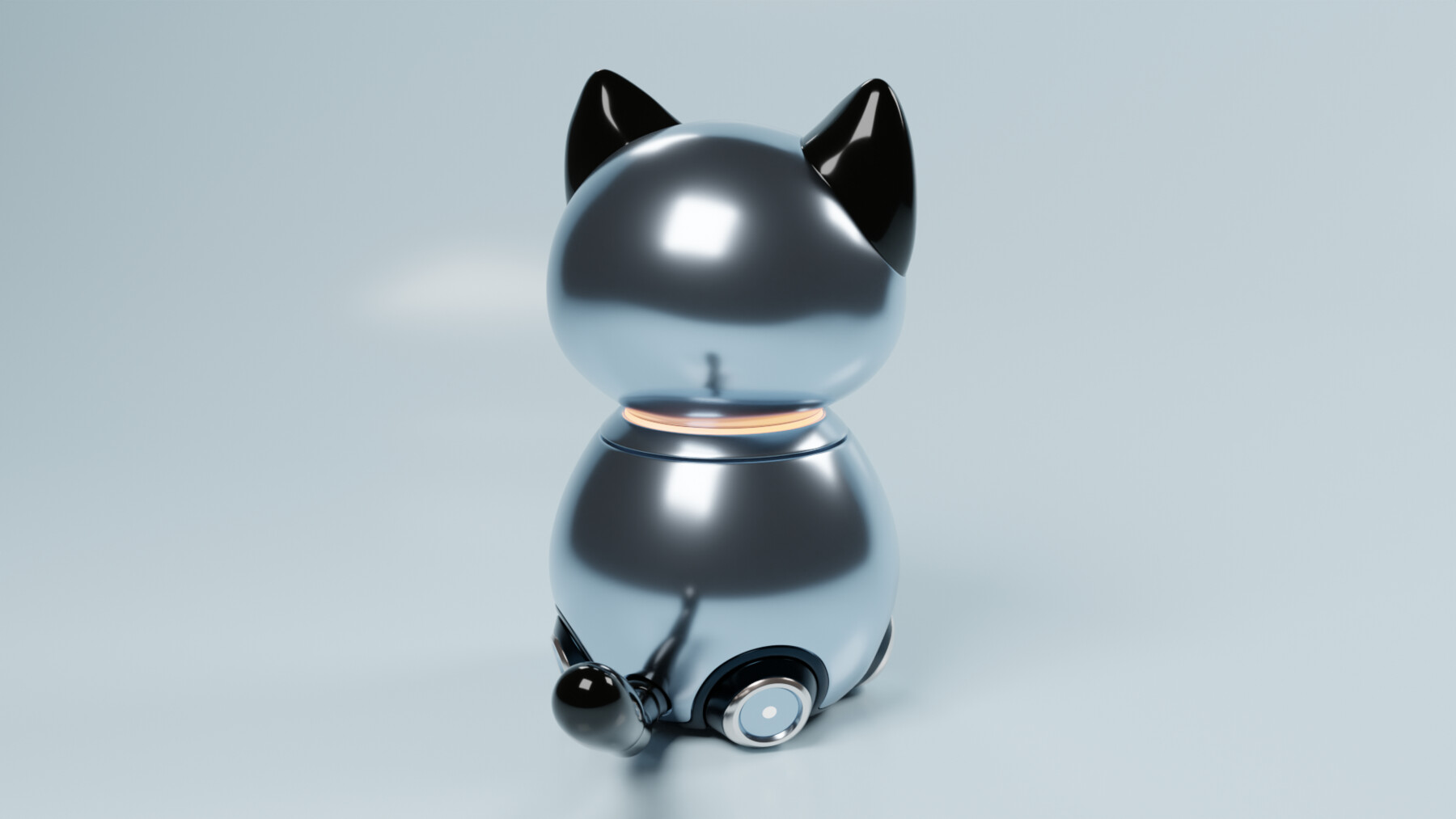
Ο Robocat είναι μια καινοτομία στον κόσμο των κατοικίδιων. Συνδυάζει την αγαπημένη μορφή ενός γάτου με έξυπνες τεχνολογίες που προσφέρουν αμέτρητες δυνατότητες στους χρήστες του. Από την αυτονομία στις κινήσεις του μέχρι την ικανότητα να αλληλεπιδρά με τους ανθρώπους, ο Robocat είναι ο απόλυτος σύντροφος για κάθε σπίτι. Ανακαλύψτε τις δυνατότητες του Robocat και επωφεληθείτε από τον robocat promo code για την αγορά σας!

Τι είναι ο Robocat;

Πρόκειται για ένα ρομπότ που έχει σχεδιαστεί για να μιμείται τις κινήσεις και τις συμπεριφορές ενός πραγματικού γάτου. Διαθέτει προηγμένα συστήματα τεχνητής νοημοσύνης που του επιτρέπουν να αντιλαμβάνεται τον χώρο γύρω του, να εξερευνά και να αλληλεπιδρά με αντικείμενα.

Χαρακτηριστικά του Robocat

  • Αυτονομία: Ο Robocat μπορεί να περιηγηθεί σε ένα δωμάτιο χωρίς να χρειάζεται ανθρώπινη παρέμβαση, αποφεύγοντας εμπόδια και κινδύνους.
  • Αλληλεπίδραση: Διαθέτει αισθητήρες και μικρόφωνα που του επιτρέπουν να “ακούει” και να “μιλάει” με τους ανθρώπους με φιλικό τρόπο.
  • Διαδραστικά παιχνίδια: Ο Robocat μπορεί να συμμετέχει σε παιχνίδια, προσφέροντας ψυχαγωγία στους ιδιοκτήτες του.
  • Σύνδεση με εφαρμογές: Ο χρήστης μπορεί να ελέγχει και να προγραμματίζει τις παραμέτρους του Robocat μέσω μιας εφαρμογής στο κινητό του τηλέφωνο.

Οφέλη του Robocat

Η κατοχή ενός Robocat προσφέρει μοναδικά οφέλη που είναι δύσκολο να βρεθούν σε ένα παραδοσιακό κατοικίδιο:

  1. Μηδενική αλλεργία: Ο Robocat δεν έχει τρίχωμα και δεν προκαλεί αλλεργίες, γεγονός που τον καθιστά ιδανικό για άτομα με ευαισθησίες.
  2. Εκπαίδευση: Ο Robocat μπορεί να εκπαιδευτεί εύκολα για να ακολουθεί εντολές και να ελέγχεται από την εφαρμογή του χρήστη.
  3. Χαμηλή συντήρηση: Σε αντίθεση με τους φυσικούς γάτους, ο Robocat δεν χρειάζεται τροφή, καθαριότητα ή επισκέψεις σε κτηνίατρο.

Εφαρμογές του Robocat

Οι εφαρμογές του Robocat είναι σχεδόν άπειρες. Από τη χρήση του ως εκπαιδευτικό εργαλείο για παιδιά μέχρι την αλληλεπίδραση με άτομα σε γηροκομεία, ο Robocat μπορεί να προσαρμοστεί σε πολλές διαφορετικές καταστάσεις. Μερικές από τις πιο συχνές εφαρμογές περιλαμβάνουν:

  • Διασκέδαση: Η δυνατότητα του Robocat να συμμετέχει σε παιχνίδια και δραστηριότητες μπορεί να προσφέρει ώρες διασκέδασης.
  • Ψυχολογική υποστήριξη: Ο Robocat μπορεί να είναι η συντροφιά όσων αισθάνονται μοναξιά ή χρειάζονται έναν φίλο.
  • Εκπαίδευση: Μπορεί να χρησιμοποιηθεί σε εκπαιδευτικά περιβάλλοντα για την εκμάθηση προγραμματισμού και τεχνολογίας.

Πώς να αποκτήσετε τον Robocat

Η διαδικασία αγοράς του Robocat είναι εύκολη και γρήγορη. Ακολουθείστε τα παρακάτω βήματα:

  1. Επισκεφθείτε την επίσημη ιστοσελίδα του Robocat.
  2. Επιλέξτε το μοντέλο που σας ενδιαφέρει.
  3. Χρησιμοποιήστε τον robocat promo code για να αποκτήσετε έκπτωση.
  4. Ολοκληρώστε την παραγγελία σας.

Συμπέρασμα

Ο Robocat είναι η επόμενη γενιά κατοικίδιων και συνδυάζει την αγάπη για τα ζώα με την τεχνολογία. Είναι ιδανικός για κά

θε σπίτι και προσφέρει μοναδικές δυνατότητες στον κάτοχό του. Είτε είστε λάτρης των γατών είτε απλά θέλετε έναν έξυπνο σύντροφο, ο Robocat είναι σίγουρα η καλύτερη επιλογή.